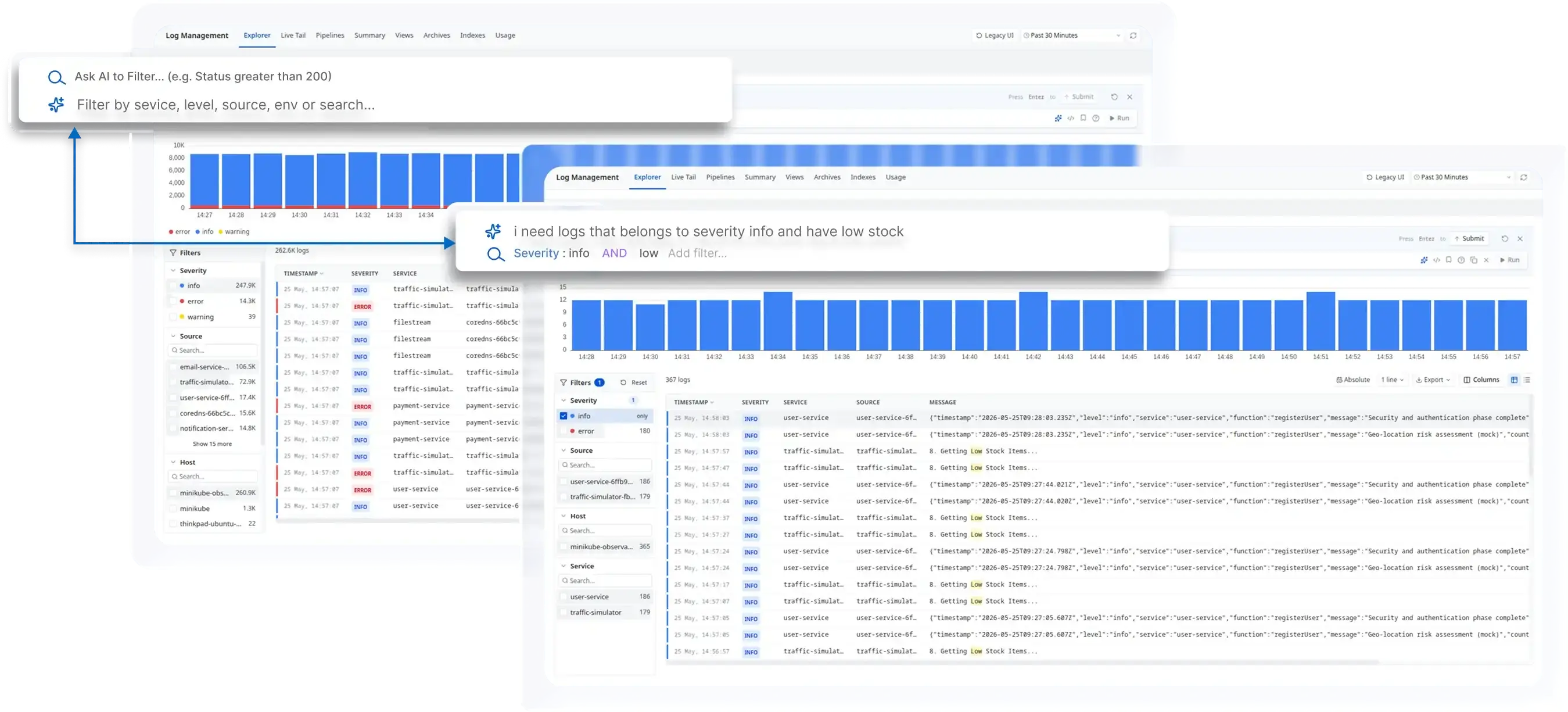
You can now find the logs you need by describing them in plain English. The AI search in the Atatus Log Explorer turns your description into filters, so you don't need query syntax or a stack of manual filters.
Type something like "errors in user-service" or "nginx logs mentioning timeout" and the search bar sets the matching filters and runs the search. During an incident, on-call engineers get to the relevant log lines sooner, while the time range stays in the time picker as usual.
What AI log search does
- Plain-English queries: Click the AI icon in the search bar, or press space in an empty bar, describe what you are looking for and press Enter. There is no query language to learn.
- Filters from your own data: The AI maps your words to fields such as severity, service, source and host, using the values that exist in your logs, and searches message text for keywords.
- Refine as you go: Ask again to narrow, widen or drop a filter. The AI starts from the filters already in the bar instead of starting over.
- Works with the filter sidebar: Combine AI-generated filters with the Severity, Source, Host and Service filters in the sidebar to narrow results further.
- Visible, editable filters: Every filter the AI adds appears in the search bar, where you can change or remove it, and the histogram and results update as soon as it applies.
- Also in Live Tail: The same AI search works when you stream logs in Live Tail.